
There are countless blog posts, videos, and articles about monday.com pricing — but let’s be honest, they all say the same thing. They walk you through products, plans, and features, then wrap up with vague recommendations. None of them really simplify the question every user actually has: Which monday.com product and plan should I choose — and what will it really cost me?
We’re not going down that well-worn path. Instead, I’ll give you the simplest (and most opinionated) advice you’ll find anywhere about choosing the right monday.com product and pricing plan. Then, we’ll look at what it’ll cost you — monthly vs. annual, hidden fees, gotchas — everything you need to finally make sense of monday.com’s pricing.
Start with the right product
Before you can wrap your head around monday.com pricing, figure out which product is right for you. Based on years of consulting experience with clients across all industries, my recommendation hasn’t changed in over three years:
One product to rule them all — Monday CRM.
Across hundreds of clients, I’ve never recommended another monday.com product, and for good reason. Monday CRM simply outperforms the rest — including Work Management, Dev, or Service.
For Nonprofits: Qualified Nonprofits get 10 free users across all four Work OS products, with additional users at roughly a 70% discount. Even then, stick with Monday CRM unless you truly need Dev (for web development) or Service (for support ticketing). Work Management adds nothing you don’t already get in CRM — it just fragments your setup. The only edge case? If you have more than 10 users and some don’t need CRM access, consider assigning them to Work Management to cut costs.
Go Pro or go home
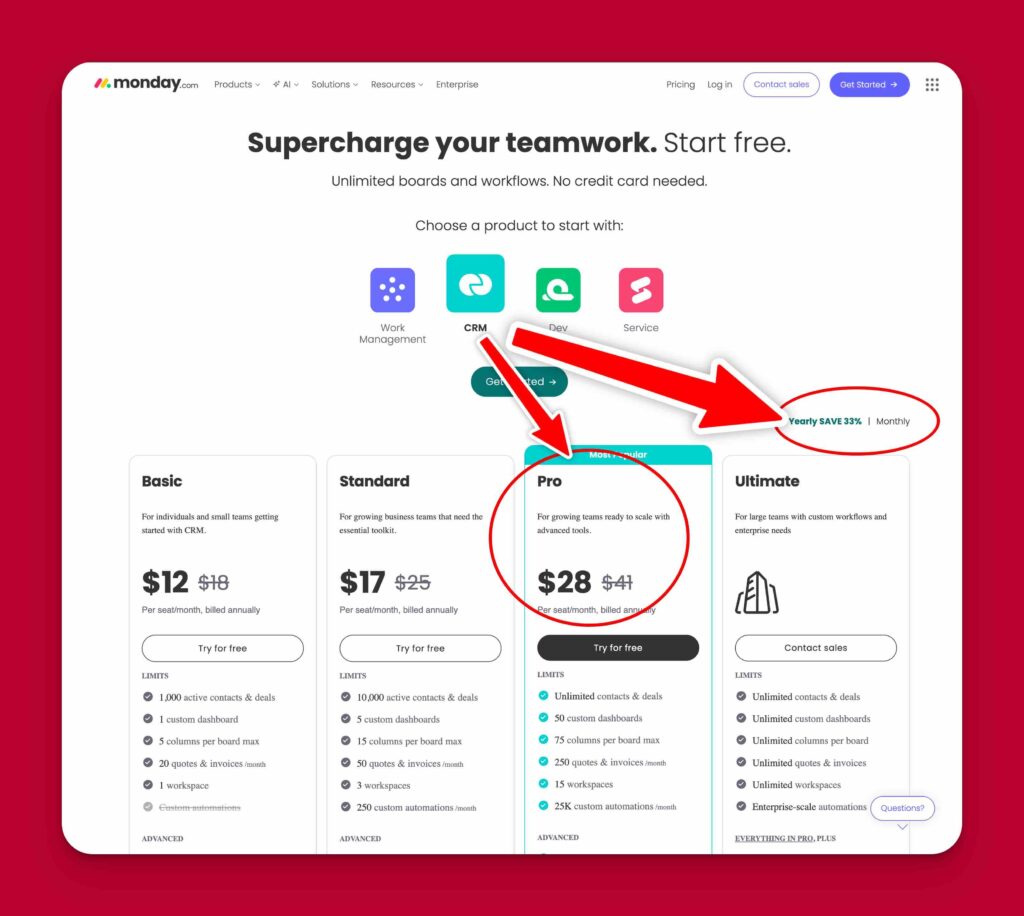
When it comes to monday.com pricing plans, I’ve only recommended one for the past few years — the Pro Plan.
Here’s why. Monday.com’s backbone has always been about:
-
- Automating busy work
-
- Integrating your core tools so everything lives in one place
-
- Connecting data across boards for powerful reporting and workflows
Every plan limits your monthly automation and integration actions — and on anything below the Pro Plan, those limits are painfully small. In short: sub-Pro plans won’t let you automate your way out of a wet paper bag.
If you think you “don’t need automations,” I’d seriously suggest considering another tool entirely. Without them, you’re not getting the full monday.com experience, and there are cheaper tools that’ll do the basics just as well.
What about Enterprise?
Sure, it offers extras like item-level permissions, better security, and unlimited workflows. But I rarely recommend it — partly because pricing info for the Enterprise Plan isn’t listed publicly (you’ll need to talk to sales), and partly because I work exclusively with small businesses and Nonprofits that don’t need Enterprise-level functionality.
So what’s it going to cost?
The pricing page can be confusing, so here are the key things to know:
-
- All paid plans require a minimum of three seats.
-
- According to the research, prices displayed on the monday.com pricing page should default to your local currency (or USD if it can’t detect one). But when I checked this fact by opening the pricing page in incognito mode and also checking my invoices I realised that the pricing page displays in US$ for me even though I am in New Zealand. So, I recommend you do the same – open the pricing page in incognito mode and budget on those prices being US$.
-
- The pricing page shows annual billing by default, which means you’ll be billed up front for 12 months.
Example:
If you pick Monday CRM Pro Plan (annual billing) for 3 users at US$28 per user/month, you’ll be charged:
28$ per month × 3 minimum paid users × 12 months = US$1008 upfront.
Switch to monthly billing if you prefer flexibility, but note you’ll lose the ~18% annual discount.
Free trial tip:
No matter which plan trial button you click, monday starts you at Pro level. So if you test under “Standard” and love what you see, remember you’ll need to upgrade to Pro to keep those features after your trial ends.
Monday.com Pricing – The A.I. Factor
Monday.com (like pretty much every other SaaS app known to man) has committed heavily to A.I. Not that long ago they offered unlimited usage on a bunch of AI features. Then it changed to a free monthly quota with (very expensive) AI Add-on Packages. Then the free monthly quota became a lifetime (ie non-renewable) quota of free AI credits.
From memory AI Add-on Packages start at US$2400 per year, payable in advance.
There are some AI powered features that don’t use AI credits, but for everything else AI-powered, unless you are prepared to pay an additional US$2400 per year you are going to run out of AI credits pretty damn quick. So, either budget on the extra $2400 or pretend those AI features don’t exist – because they may as well not exist if you don’t purchase one of the AI add-on packages.
TL;DR
-
- Choose Monday CRM Pro Plan — full stop.
-
- Skip Work Management (CRM can do everything it can, and more).
-
- If you can’t afford automations or integrations, seriously consider another tool.
Using monday.com without automations is like buying a Ferrari and removing the engine because you “don’t need it to go fast.” In that case, you’re better off with a Lada and a bigger savings account.